

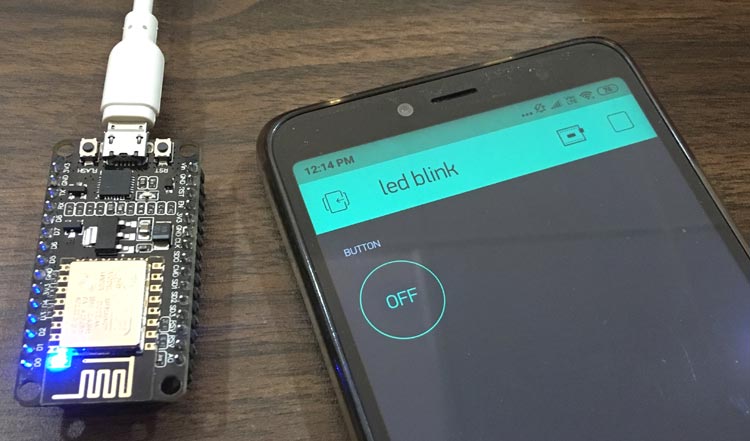
ESP IoT Control and Monitoring with Blynk Platform Guide
Building IoT applications traditionally required developing mobile apps, backend servers, and complex networking infrastructure. ESP IoT control and monitoring with Blynk eliminates these barriers by providing ready-made mobile and web interfaces, cloud services, and device connectivity—transforming ESP microcontrollers into fully functional IoT systems within minutes rather than months.
Understanding Blynk Platform
Blynk provides comprehensive IoT platform combining mobile apps, web dashboards, and cloud services specifically designed for makers and IoT developers. Rather than building everything from scratch, developers leverage Blynk’s infrastructure focusing on application logic and hardware integration.
The platform supports ESP32, ESP8266, Arduino, Raspberry Pi, and numerous other microcontrollers through unified API. This hardware flexibility enables consistent development approaches across different projects and platforms.
Blynk operates on virtual pin concept abstracting physical GPIO pins. Virtual pins represent data channels bidirectionally transmitting information between devices and applications. This abstraction enables complex data types beyond simple HIGH/LOW digital signals.
Free tier provides sufficient functionality for learning and hobby projects. Premium tiers add features like unlimited devices, extended data storage, and advanced analytics suitable for commercial deployments.
Getting Started with Blynk
Creating Blynk accounts through mobile apps or web interface establishes user profiles and project workspaces. Each project receives unique authentication tokens identifying devices to Blynk cloud services.
Template creation defines device types—smart lights, weather stations, irrigation controllers—with associated dashboards and data structures. Templates enable deploying multiple identical devices without recreating interfaces.
Mobile app installation for iOS or Android provides primary control interface. The app’s drag-and-drop designer creates custom dashboards placing buttons, sliders, displays, and charts controlling and monitoring devices.
Authentication tokens connect ESP devices to Blynk cloud. Copying tokens from Blynk console into ESP code establishes secure authenticated connections enabling bidirectional communication.
Hardware Setup and Wiring
ESP32 and ESP8266 boards connect to sensors and actuators through GPIO pins. Temperature sensors, humidity sensors, light sensors, motion detectors, relays, motors, and LEDs attach to ESP pins providing physical input/output capabilities.
Proper wiring prevents damage and ensures reliable operation. Understanding voltage levels, current requirements, and pin capabilities protects hardware while enabling correct signal reading and device control.
Breadboard prototyping enables experimentation without soldering. Once designs prove functional, permanent soldering or PCB fabrication creates durable installations.
Power supply considerations affect reliability especially for battery-operated or high-current applications. Voltage regulators, capacitors, and proper power distribution prevent brownouts and erratic behavior.
Software and Interface Creation
Arduino IDE integration with Blynk library simplifies development. Wi-Fi configuration connects ESP devices to networks accessing Blynk cloud. Basic sketch structure includes library imports, credentials, authentication token, virtual pin handlers, and main logic.
Virtual pin functions handle data exchange. BLYNK_WRITE receives data when users interact with widgets. BLYNK_READ sends data when widgets request updates.
Button widgets send digital signals controlling LEDs or relays. Slider widgets enable analog control for motor speeds or LED brightness. Switch widgets provide toggle controls with state indication. Joystick widgets offer two-axis control for robotics.
Value display widgets show numerical sensor readings with automatic updates. Gauge widgets provide visual analog displays. Chart widgets visualize data over time revealing trends. Terminal widgets display text messages for logging and debugging.
Automation and Advanced Features
Timer widgets schedule device actions at specific times automating irrigation or lighting. Notification widgets send push alerts when conditions occur—temperature thresholds or motion detection.
Blynk events combine multiple conditions creating complex automation. Device-to-device communication through Blynk cloud enables distributed systems coordinating behaviors.
Blynk stores sensor data accessible through charts and export. Superchart displays multiple streams simultaneously. Data export downloads historical records for external analysis.
Webhooks trigger external services integrating with IFTTT or custom APIs. Over-the-air updates deploy firmware remotely. Multi-user access allows sharing device control with configurable permissions.
Applications and Best Practices
Smart home automation controls lights, thermostats, and security systems through unified interfaces. Room-specific controls, schedules, and automation create comfortable, efficient living environments managed from anywhere.
Agricultural monitoring tracks soil moisture, weather conditions, and equipment status. Remote farm management reduces manual labor while optimizing irrigation, fertilization, and harvesting timing through data-driven decisions.
Industrial monitoring observes equipment performance, environmental conditions, and production metrics. Real-time visibility enables quick problem response preventing downtime and maintaining quality standards.
Educational projects teach IoT concepts through hands-on building. Students create functional systems without complex programming, focusing on concepts rather than implementation details.
Connection failures typically result from incorrect authentication tokens, Wi-Fi credential errors, or network firewall restrictions. Systematic verification of each component isolates problems. Data synchronization delays occur with poor connectivity. Widget configuration errors cause unexpected behaviors—carefully matching virtual pins between code and app prevents control/monitoring mismatches.
Authentication token protection prevents unauthorized device access. Never share tokens publicly or commit them to repositories. Regular firmware updates patch discovered vulnerabilities, keeping ESP code and Blynk library current reduces security risks. Network security through WPA2 encryption and firewall configuration protects data transmission.
Blynk IoT platform democratizes development, enabling anyone with ESP microcontrollers and creativity to build professional-quality connected devices. From simple LED control to sophisticated industrial monitoring, Blynk provides infrastructure transforming hardware projects into cloud-connected systems accessible worldwide through elegant mobile and web interfaces.